
My university is preparing for an upcoming math competition. They want to give each attendant a certificate so they need a tool that will take a template, put in the names, and export as PDF. They asked me what editor they could use. Sure, they could use something like libreoffice, but filling in each name and saving into a new file manually takes a bit too long. I want to make a simple utility that takes the list of names and the template, generates the certificates and exports them both as a single PDF (to print out) and as separate files (to send via e-mail).
This is a really simple project, and also a perfect opportunity to build a simple site (this one) as the styles are going to be shared.
I don't want any images on the site, so I'll try to stick with SVGs.
Cert Layout
I started by sketching out the UI on a piece of paper. Since I won't include raster images, here's an excalidraw version of that:
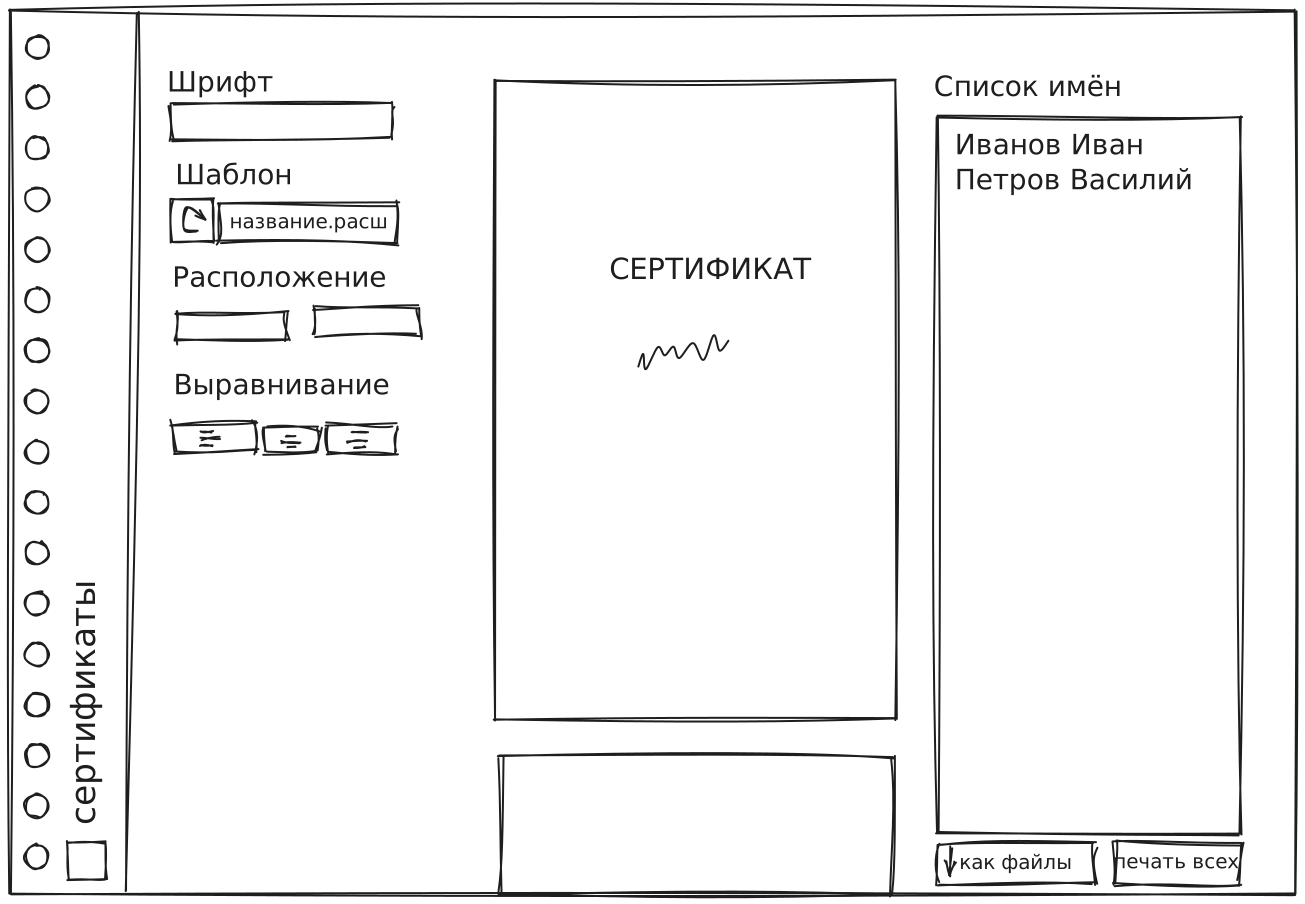
I've considered using React or Lustre, but the project is simple enough I don't need them.
The bottom-left square is a placeholder for the university logo (for some reason we have 2 of them, this is for the simpler one). I've decided to write the SVG for it by hand (so it can be styled by the page), "An Interactive Guide to SVG Paths" by Josh W Comeau is a very good resource to learn how to do that.
After writing the actual HTML I've decided to swap the name list and the settings, so the actual app is a reflected version of the drawing above.
Template Selection
I want pages to be based on <image>s, and that tag doesn't support PDF. I've found a simple library to convert them to PNGs.
Generating The Preview
I could re-create every element on every change, but that seems a bit wasteful. A better option is to create some CSS variables and change them from the JS side.
Doing that means that the image src should also be set from css. A StackOverflow comment mentioned that Firefox didn't allow you to do that, but it seems to work now. Sure, you could set the background-image property on a div instead, but then you'd need to calculate the aspect ratio of a newly uploaded image from JS.
Text Alignment
The element is position: absolute. I've set text-align to center and this, obviously, didn't work. There are a few ways to fix this. I've tried an SVG overlay with text-anchor, but that didn't let me set x and y through CSS. An option that worked is simply transform: translate'ing the element (not using an SVG).
Well, kind of worked. It fixed the alignment, but scaling the page or printing it resulted in the text moving around. Returning to SVGs :)
SVG elements also support the normal position: absolute and top, left, right, bottom properties, so that solves the positioning problem.
For that to be useful, I need a viewbox though. Which means... Yes, figuring out the image dimensions from JS. Sure whatever. Except it still doesn't work. I couldn't figure out why, it seems like if I set the font size in a variable, it takes the HTML pixel size, not the SVG one.
Container-query units worked. They always work.
Printing
CSS allows you to customize the printed view using @media print.
Saving multiple files from JS is a whole thing though. The short version is that the browser does not allow printing without the dialog and that is the only reliable way. External libraries can't handle images created as object URIs in CSS. To be honest, that's quite reasonable, how long has it been since you've seen them being created like that?
Another option is to bring in the typst compiler and make it handle the PDF generation.
User feedback
- I was switching the language if
navigator.language === "ru", and that doesn't work on Windows because there it's"ru-RU". Fixed - They asked me to use JetBrains Mono as the default font
- The name input should also accept e-mails so the users know who to send the generated certs
- Ideally there should be a send button
The last point is fun. I've never worked with E-Mails so this weekend I'm diving into that.
Site Todo
I'll link to this note from the next one, so the site should be able to display backlinks.